
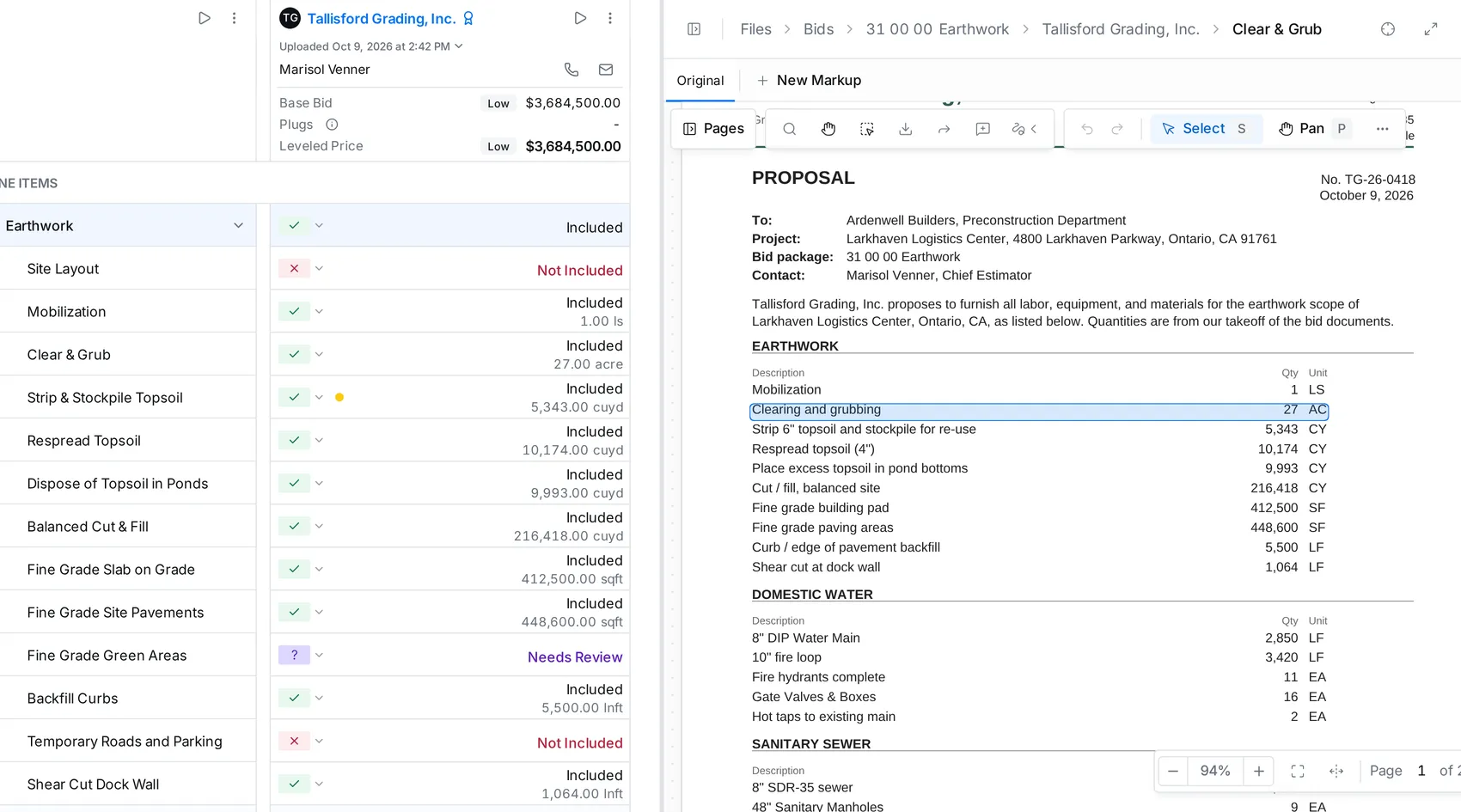
Every number on a leveled bid tab should link back to the exact place it came from in the subcontractor’s proposal. In Consight, each extracted price, inclusion, exclusion, and qualification is tied to its source, and View in Bid jumps to the spot in the proposal where it appears. Estimators verify a match in seconds, correct it if needed, and award knowing where every number came from.
Key takeaways
- A bid tab nobody can trace is a bid tab nobody can defend.
- AI extraction is only trustworthy when every result links to its source text.
- Check high-value lines and exclusions against the source before you award.
Why does traceability matter in bid leveling?
When an estimator retypes a proposal into a spreadsheet, the link between the number and the page it came from is lost. Weeks later, during buyout or a change order dispute, nobody can say whether a subcontractor excluded controls or whether someone missed a line. Traceability keeps that evidence attached to the number.
It matters even more with AI. Software that reads proposals will occasionally misread one. If every result shows its source, an estimator can verify it in seconds. If it doesn’t, the team either trusts it blindly or rereads every proposal, which defeats the purpose.
How do you trace a leveled number back to the proposal in Consight?
- Open the scope sheet for the bid package. Each bidder has a column and each scope item a row.
- Pick the cell you want to check, such as a price, an exclusion, or an alternate.
- Use View in Bid to jump to the exact spot in the proposal the value came from.
- If the match is right, give it a thumbs up. If not, move it to the right scope item, tab, or package, or add a plug. A thumbs down on a wrong match improves future results.
- Before you soft award, do a final pass on high-value lines and every exclusion.
What should you verify against the source before award?
- The base bid and any breakouts, exactly as written on the proposal.
- Every exclusion and qualification, and the scope line it affects.
- Alternates and allowances, kept separate from the base bid.
- Rows waiting under Suggested Scope, which Level Bids added for bid prices your sheet did not list.
- The gap between Base Bid and Leveled Price, which shows what you added or fixed.
Read more about finding scope gaps before award and what AI bid leveling is.
How does traceability connect to the plans and specs?
Consight keeps the plans, specifications, and addenda in the same project, and Connie, Consight’s AI assistant, answers questions from your bid packages, bids, and scope sheets first, then your uploaded plans, specs, and addenda. When a bidder qualifies their scope, you can check it against the spec section that requires the work. See how to generate a scope of work from plans and specs.
Where Consight fits
Consight is the preconstruction workspace built around this kind of work—from understanding project documents and building scopes to collecting bids, leveling proposals, reviewing risk, and documenting the final award.
Put it into practice on your next project.
Talk to sales