
Workflow — Step 4 of 6
Organized scope sheets for every bid package
Consight normalizes every subcontractor proposal against your scope of work, so inclusions, exclusions, and gaps line up side by side before you award.
3 bids leveled0 of 3 bids received
Bid leveling · 31 00 00 Earthwork
Line items
1Site preparation
2Clearing and grubbing
3Hazardous soil removal
4Flatwork demolition
5Erosion control
Site preparation Subtotal
6Earthwork and grading
7Earthwork mobilization
8Site mass grading
9Pad overexcavation
10Subgrade preparation
Earthwork Subtotal
Leveled total
Internal estimate
From plans$479,950
—$48,5004.20 ac @ $11,548
—$12,2002.00 ea @ $6,100
—$36,7503,205.00 sf @ $11.47
—$22,0001,650.00 lf @ $13.33
$119,450
—$18,0001.00 ls @ $18,000
—$214,30038,400.00 cy @ $5.58
—$96,80012,300.00 cy @ $7.87
—$31,4003,050.00 sf @ $10.30
$360,500
$479,950
PG
Pacific Grading
Awaiting bidLow
Pending$486,100
—$46,9004.35 ac @ $10,782
—Included
—$37,9003,180.00 sf @ $11.92
—Included
$84,800
—$17,6001.00 ls @ $17,600
—$289,40037,950.00 cy @ $7.63
—$94,30012,150.00 cy @ $7.76
—Included
$401,300
$486,100
HE
Hillside Earthworks
Awaiting bidLow
Pending$499,950$36,750 plug
—$49,2004.10 ac @ $12,000
—Not Included
—Not Included$36,750 plug
—Included
$85,950
—$17,5001.00 ls @ $17,500
—$296,80038,600.00 cy @ $7.69
—$99,70012,420.00 cy @ $8.03
—Included
$414,000
$499,950
SE
Summit Excavation
Awaiting bidLow
Pending$514,000
—?Needs Review
—Included
—Included
—$24,5001,690.00 lf @ $14.50
$24,500
—Included
—$392,00039,100.00 cy @ $10.03
—$97,50012,280.00 cy @ $7.94
—Included
$489,500
$514,000
2 bids leveled0 of 2 bids received
Bid leveling
31 00 00 Earthwork · site preparation
Line items
Scope
1Site preparation
2Clearing and grubbing4.20 ac
3Hazardous soil removal2.00 ea
4Flatwork demolition3,205.00 sf
5Erosion control1,650.00 lf
Subtotal
Internal estimate
From plans$479,950
—$48,5004.20 ac
—$12,2002.00 ea
—$36,7503,205.00 sf
—$22,0001,650.00 lf
$119,450
PG
Pacific Grading
Awaiting bid
Pending$486,100
Low—$46,9004.35 ac
—Includedanother line
—$37,9003,180.00 sf
—Includedanother line
$84,800
HE
Hillside Earthworks
Awaiting bid
Pending$499,950$36,750 plug
Low—$49,2004.10 ac
—Excludedoutright
—Excluded$36,750 plug
—Includedanother line
$85,950
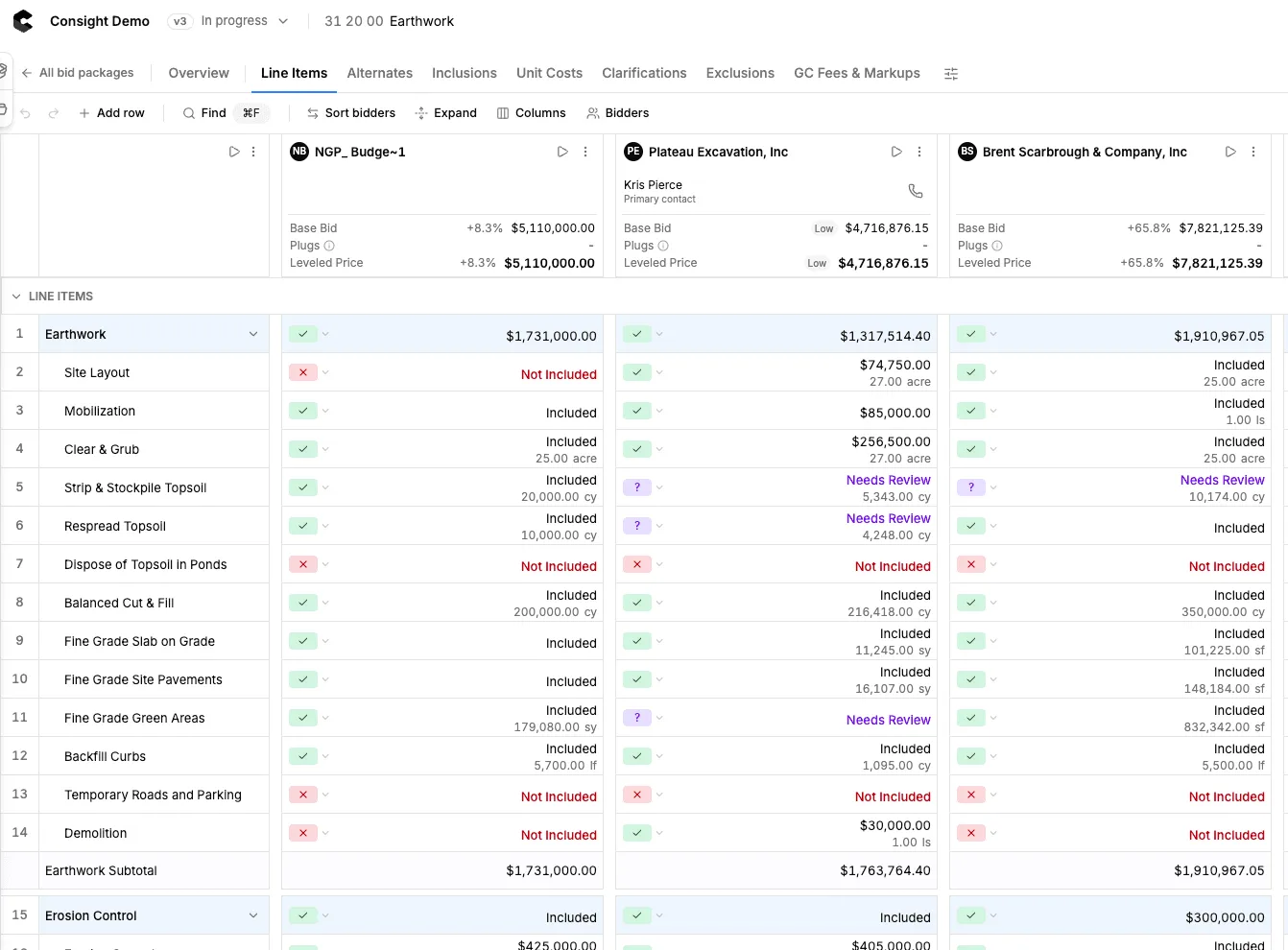
Level Bids
Drop in bids, get apples-to-apples comparisons fast
- Reads proposals in any format
- Maps bid lines to your scope
- Normalizes units and quantities
- Highlights exclusions and gaps
- Flags outliers and missing trades
- Keeps every bid revision as a version
- Adjustments stay fully editable
- Saved leveling views per trade
- Exports a clean bid tab sheet
Leveling sheet
Trust but verify. Every line item connects to its source.
Quickly view extracted data in its original source document.
Learn more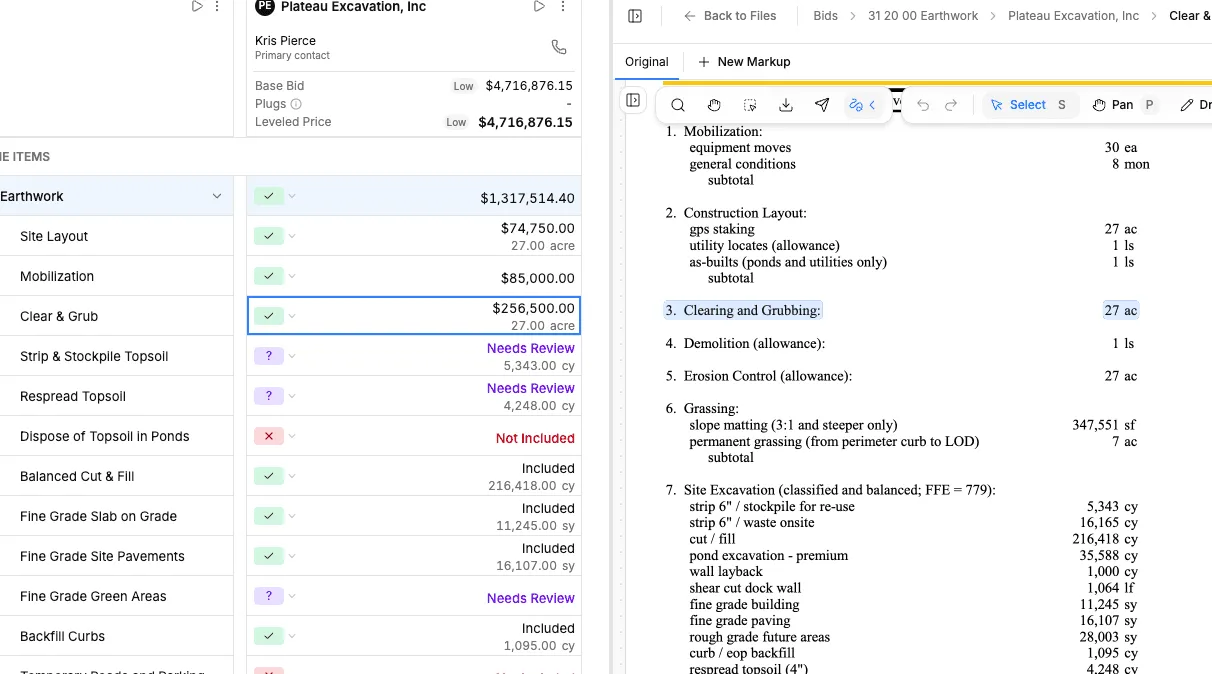
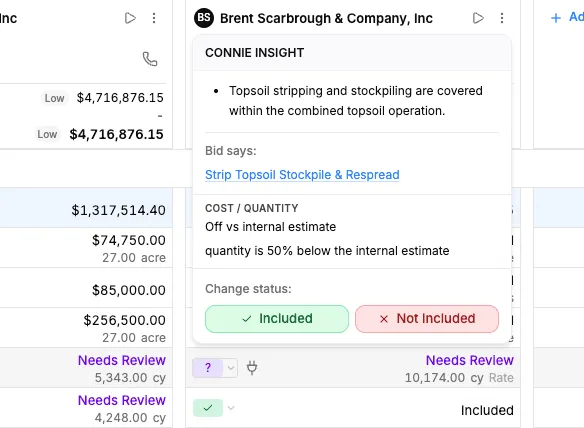
Risk review & gap detection
See exactly which trades left work out, where coverage overlaps, and what needs a clarification before award.
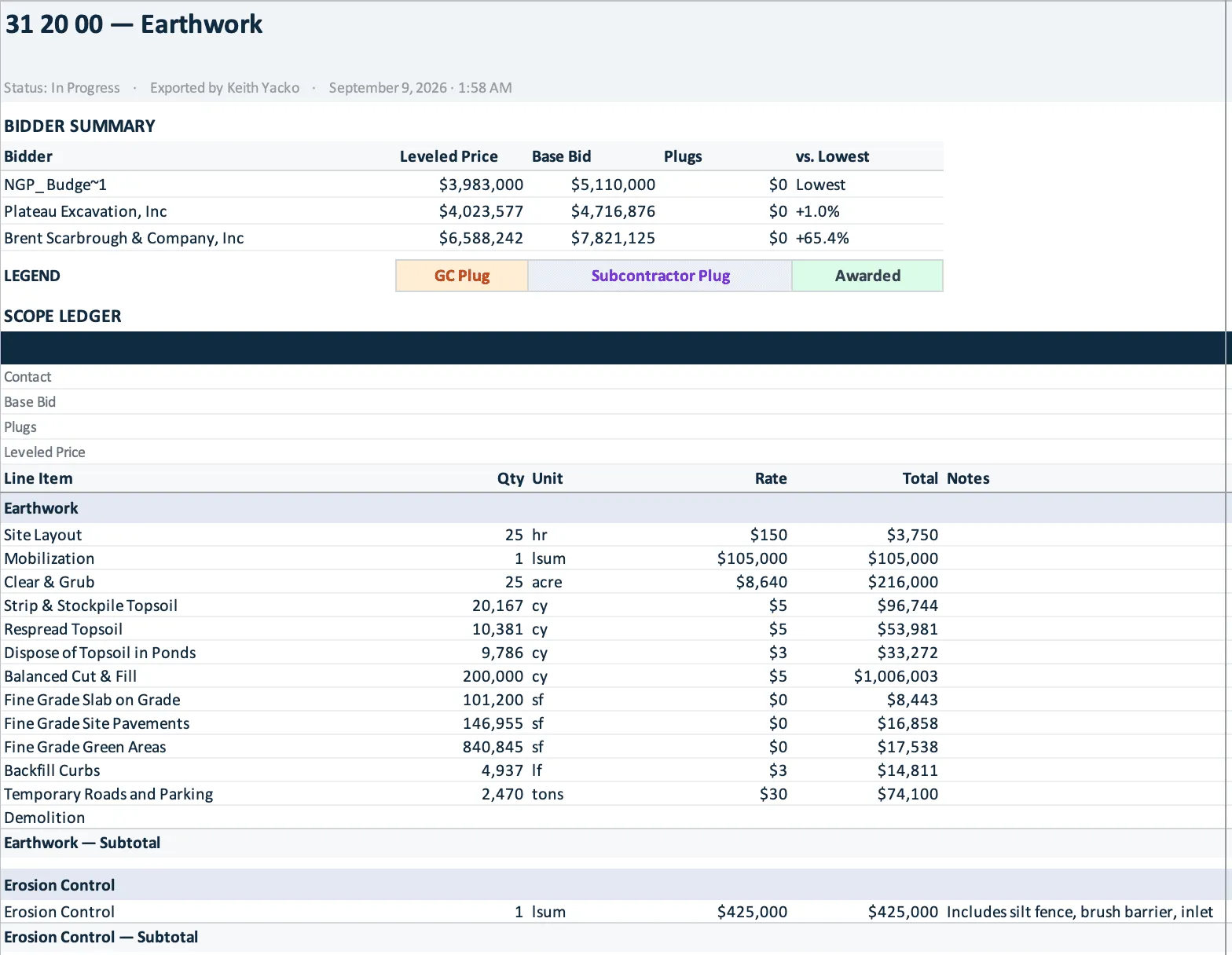
Award-ready exports
Share a leveled comparison with owners and push the final numbers into the tools your team already runs.
Up next — Step 5 of 6
Review and compare the leveled bids
Put every bidder on the same scope sheet and see exactly where the numbers diverge.
Bid leveling questions
What is bid leveling?
Bid leveling compares subcontractor bids against the same scope of work, adjusting for exclusions, plugs and missing items, so you can award on equal terms rather than on the lowest headline number.
How does Consight level subcontractor bids?
Consight reads proposals in any format, maps each bid line to your scope, normalizes units and quantities, and highlights exclusions, gaps and outliers side by side.
Can I see where an extracted number came from?
Yes. Every line item links to its source, so you can open the original proposal and check the extracted value before you rely on it.
What happens when a subcontractor sends a revised bid?
The revised bid becomes the active version for that bidder, and the earlier version stays available, so you never rebuild the comparison.
Can I adjust the AI's leveling?
Yes. Every adjustment stays fully editable, and you can save leveling views per trade.
Can I export the leveled bids?
Yes. Export an Excel workbook with a summary sheet and a scope sheet for every bid package, showing each bidder's plugs and leveled price. Totals and markups stay live formulas, so the workbook recalculates when you change a number.
How do I pick a subcontractor when the lowest bid isn't the best value?
Compare leveled prices, not base bids. Plug the scope each bidder left out, correct quantities, and price their exclusions; then weigh what is left, such as qualifications, schedule, and past performance, against the leveled difference. In Consight each bidder's Leveled Price is the base bid plus plugs and corrections, with exclusions and qualifications listed beside it.