
BuildingConnected + Consight
BuildingConnected bid leveling, built for the actual subcontractor proposal.
Keep BuildingConnected for bidder invitations and bid collection. Consight imports the bids, reads every subcontractor proposal, builds the scope sheet, and levels pricing, inclusions, exclusions and qualifications apples-to-apples.
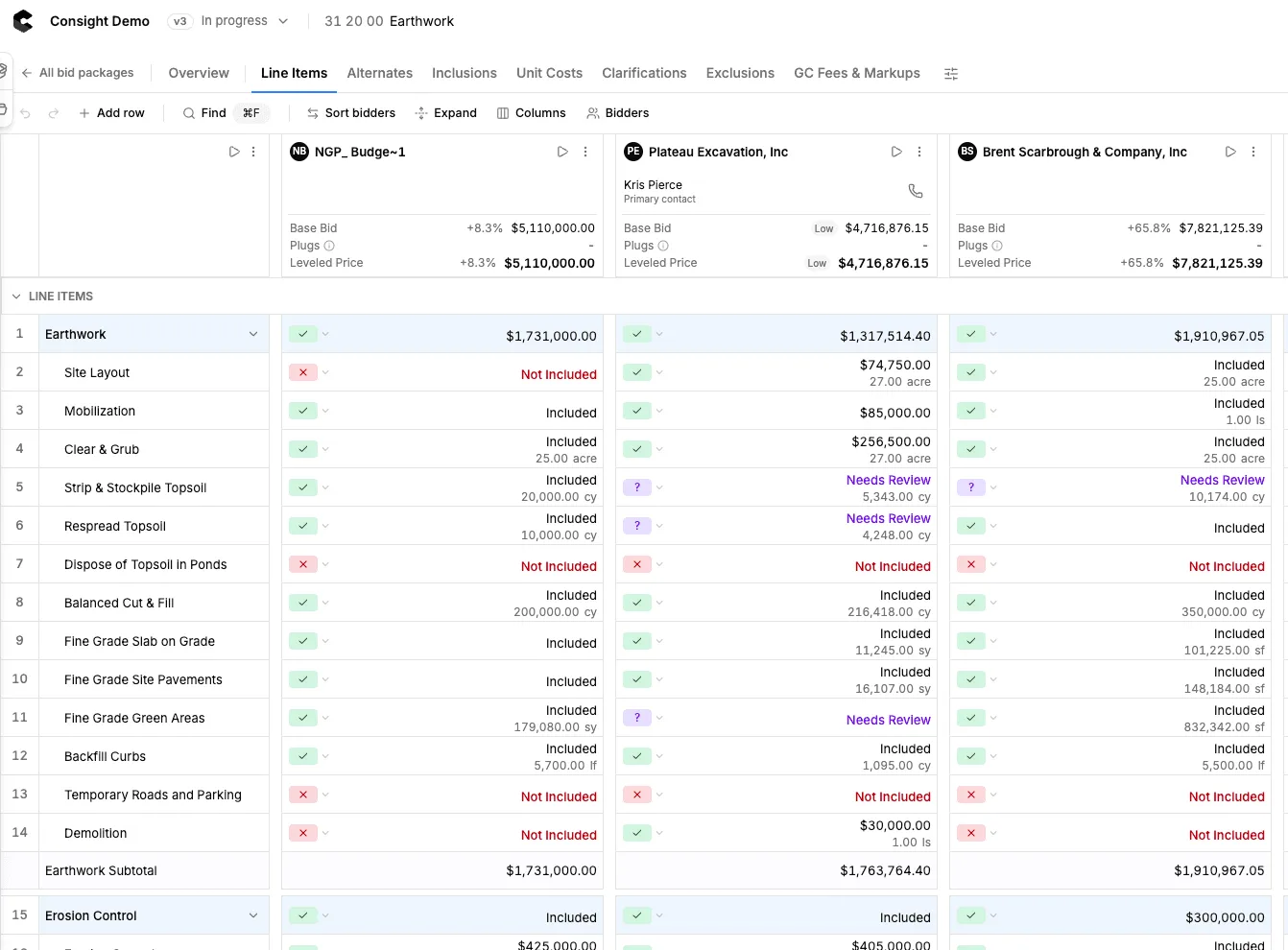
BuildingConnected gets the bids in. Consight shows you what they actually include.
BuildingConnected levels the information entered into its bid workflow. Consight reads the subcontractor proposal itself and lays it out on one scope sheet: scope included by each bidder, exclusions and qualifications, base bids and alternates, missing scope, revisions, and leveled pricing with plugs, each traced back to where it appears in the original bid.
See how bid leveling works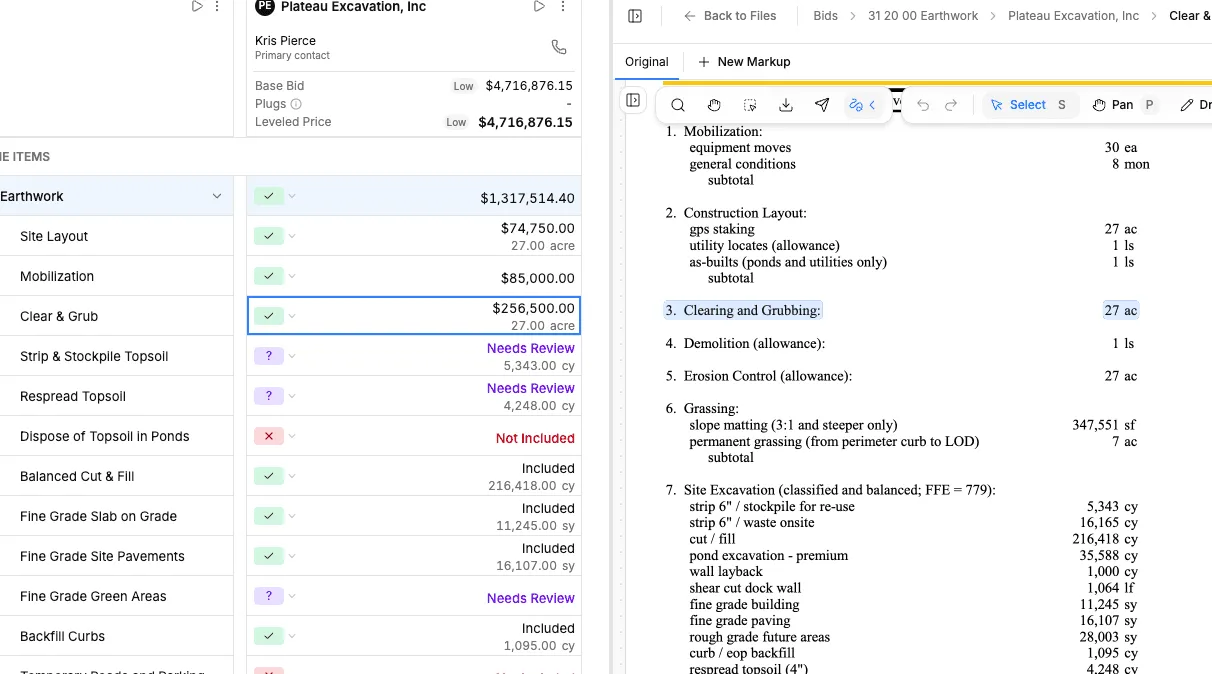
Turn BuildingConnected subcontractor bids into an apples-to-apples comparison
- Extracts pricing, inclusions and exclusions from every proposal
- Matches each bid to your scope, not just lump-sum totals
- Surfaces scope gaps, exclusions and qualifications
- Keeps base bids, alternates and breakouts organized
- Plugs missing scope while keeping the original price
- Traces every extracted item back to the source bid
- Compares every bidder against your internal estimate
- Keeps every revised bid and its earlier versions
- Exports a bid tab the owner can follow
Generate the scope sheet before bid day.
Clear scope before the bids go out makes leveling easier when they come back. Upload the plans and specifications and Consight drafts your subcontractor scope sheet, or start from the bid form lines imported from BuildingConnected. Add company standards, project-specific items and estimator judgment, then level every bid against that same scope. Plans and specs, then scope sheet, then leveled bids.
See scope generation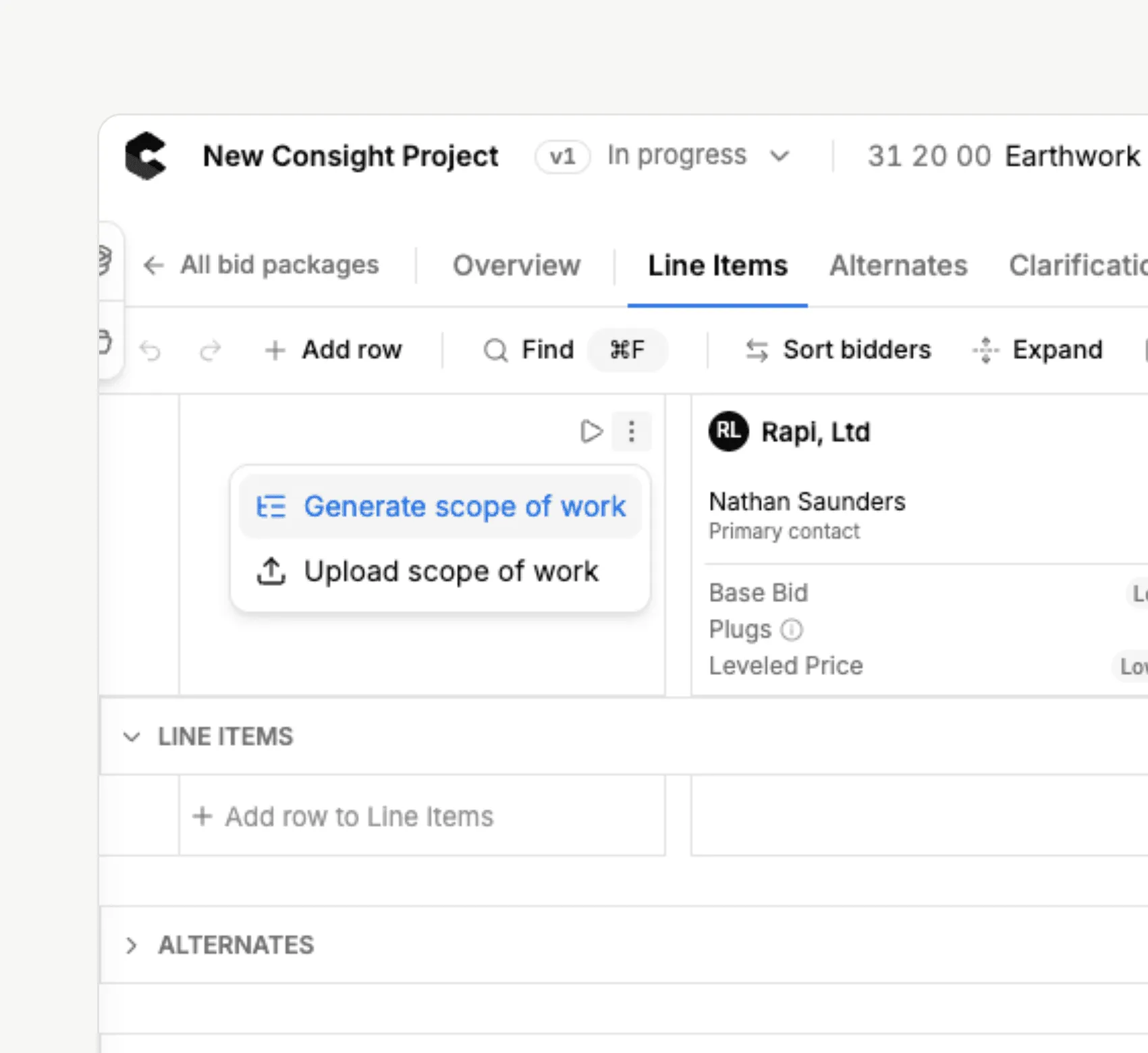
How it works
A better workflow for BuildingConnected bid day
Solicit subcontractors in BuildingConnected
Keep your bidder network, invitations to bid, bid packages and bidder communication where your team already works.
Import the project into Consight
Bid packages, bid forms, bids, files and bidder contacts come across in one pass. New bids keep arriving on their own.
AI reads every subcontractor bid
Bid form lines become your scope sheet. Consight extracts pricing, scope, exclusions, qualifications and alternates from each proposal.
Level, review and award
Compare every bidder against the same scope, plug the gaps, choose who to carry and export your bid analysis.
Side by side
BuildingConnected and Consight do different jobs
Bidder lists and invitations to bid
BuildingConnectedBidder network, ITBs and bid board
ConsightNot its job. Keep using BuildingConnected
Collecting subcontractor proposals
BuildingConnectedBids and files submitted by bidders
ConsightImported automatically, read-only
Scope sheets
BuildingConnectedBid forms built by your team
ConsightDrafted from plans and specs, then edited by you
Reading the proposal PDF
BuildingConnectedBid form data, with the file there to review
ConsightPricing, inclusions and exclusions extracted
Bid leveling and scope gaps
BuildingConnectedLeveling tools, with manual review and plugs
ConsightEach bid mapped to scope, gaps flagged on the line
Revised bids and the final bid tab
BuildingConnectedRevisions and exports
ConsightEvery revision kept, leveled tab with traceable math
Still leveling BuildingConnected bids in Excel?
You’re not the only one. Many estimators solicit in BuildingConnected, then download every proposal, retype it into an Excel bid tab, read the exclusions and add plugs by hand. With Consight the bids flow from BuildingConnected straight onto a leveled scope sheet, so your team reviews instead of retyping, without giving up BuildingConnected.
Compare Consight to Excel bid tabs
Built for the realities of subcontractor bid leveling
- Last-minute bids, leveled without retyping the bid tab
- Revised bids compared without losing earlier versions
- Exclusions that make the low bidder not actually low
- Scope gaps between bidders and trades, caught before buyout
- Alternates and breakouts kept apart from the base bid
- Bid citations to verify every AI-extracted number
- Plugs and adjustments that preserve the original price
- One live scope sheet for every estimator on the job
- New BuildingConnected bids arriving on their own
Consight gives our team a more consistent way to catch scope gaps before award.




BuildingConnected bid leveling FAQ
Does Consight integrate with BuildingConnected?
Does BuildingConnected have bid leveling?
Can Consight level bids from BuildingConnected?
Can Consight replace Excel bid leveling sheets?
Can Consight create subcontractor scope sheets?
Can I still use BuildingConnected to invite bidders?
Keep reading