
Beyond the bid tab
Keep the spreadsheet thinking. Lose the fragile bid tab.
Excel got estimating this far for a reason — it bends to how you work. What it cannot do is remember where a number came from, tell you what a bidder excluded, or survive the third revision on bid day.
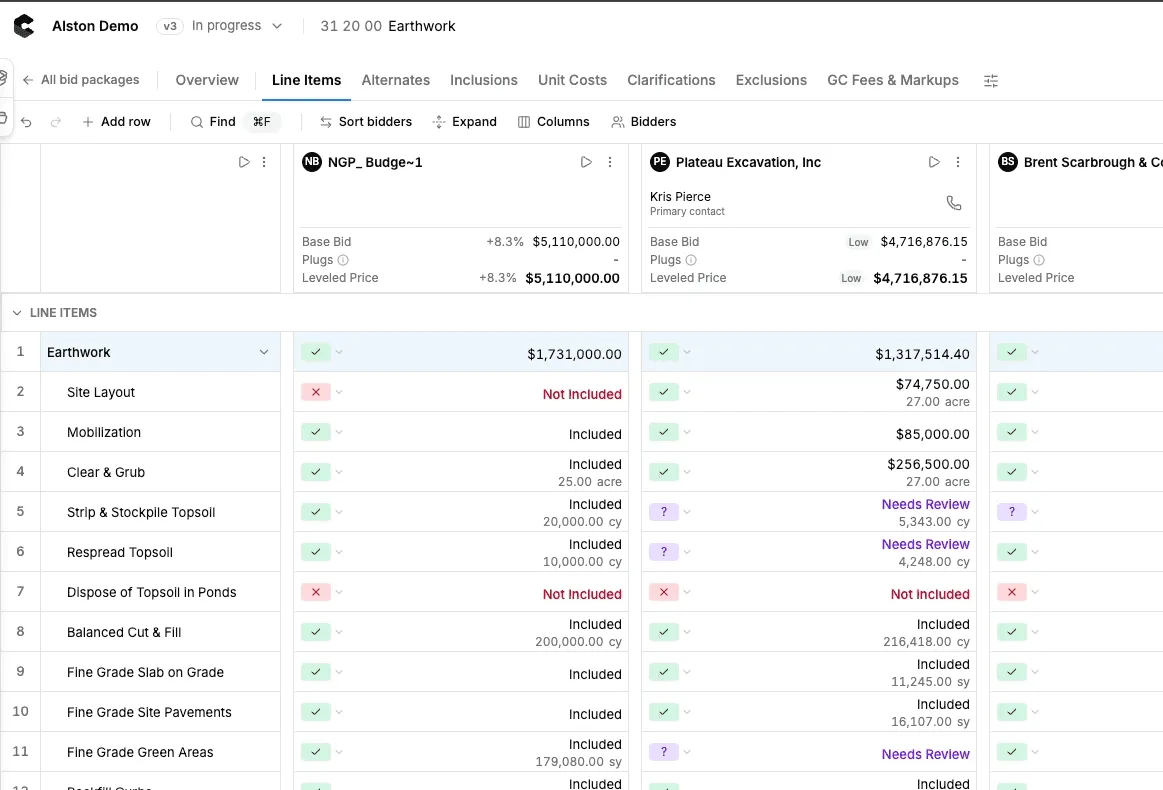

What you keep, and what stops breaking
- Line items and quantities you control
- Adjustments and overrides on any cell
- Your own scope language, not ours
- Formulas that cannot be overwritten by accident
- Every number linked to its source proposal
- Exclusions pulled out of the PDF
- Version history instead of file_v7_final
- One live sheet for everyone on the team
- Export back to Excel whenever you need it
Every cell can answer where it came from
In a spreadsheet a number is just a number and you trust whoever typed it. Here, click a line and see the page of the proposal it was pulled from, what the sub actually wrote, and what was adjusted.
See risk review and gap detection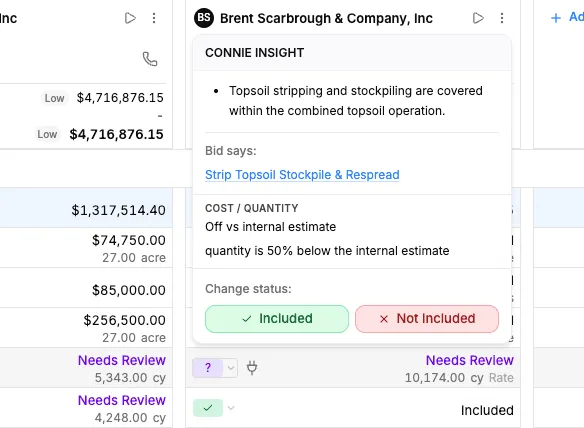
How it works
Moving one package off the tab
Bring your structure
Start from the way you already break out a package. Your line items, your trades, your order.
Drop in the bids
No copy-paste. Proposals are read and mapped to the lines you already have.
See what the tab was hiding
Exclusions, missing scope, and outliers against your estimate get called out instead of living in a PDF.
Adjust and export
Override anything you disagree with, then export to Excel or share a clean comparison.
Side by side
The same package, two ways
Starting a package
Excel bid tabCopy last job's tab and clean it up
ConsightScope sheet built for the package, editable line by line
Entering a bid
Excel bid tabManual typing, then a second pass to check it
ConsightRead from the proposal and mapped to your lines
A formula gets overwritten
Excel bid tabNobody notices until the numbers look wrong
ConsightThe math is structural — you edit values, not formulas
A revised bid lands at 2pm
Excel bid tabRework the tab and hope the columns still line up
ConsightThe revision becomes the bidder’s current version, and the earlier one is kept
Two people in the file
Excel bid tabSomeone ends up working in a stale copy
ConsightOne live sheet the whole team is looking at
Handing it to a PM after award
Excel bid tabA tab only the author can explain
ConsightA record anyone can follow back to source
Excel is not the problem. Doing it twice is.
Nobody wants to take the spreadsheet away from an estimator who is fast in it. The cost is not the tool — it is the hours spent retyping proposals into it and the risk that something quietly breaks between bid day and award.
See how bids get leveled
Consight gives our team a more consistent way to catch scope gaps before award.




Moving off the bid tab
Can we still export to Excel?
What is actually wrong with Excel for bid leveling?
When is a spreadsheet good enough for bid leveling?
What are the alternatives to bid leveling spreadsheets?
Do we have to give up our own line item structure?
Can estimators still override the numbers?
How long does it take to switch?
What happens to our old bid tabs?
Keep reading